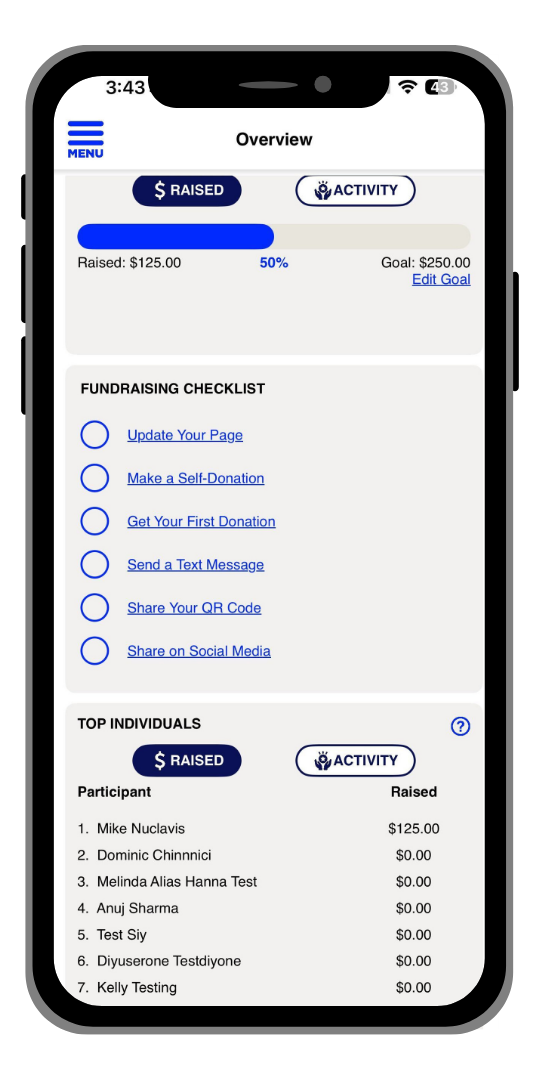
Fundraising Checklist

HOW TO FUNDRAISE WITH THE FUNDRAISING CHECKLIST?
Fundraising Checklists:
If the organization you are fundraising with has the Checklist enabled, inside the mobile app, you can use the Actionable Fundraising Checklist that is located on the Overview screen. The Checklist links app users to key fundraising calls-to-action, this feature will make it easier than ever for you to stay on track and hit your goals. Please note some items on the fundraising checklist are able to be manually checked. For these, text will appear at the bottom to indicate if a task is a self-reported task. The call-to-action items will remain linked even after a user checks them off. This ensures that when users return to the checklist and want to repeat an action, they can still access the relevant link directly from the list.