41
41
Donation Management
View donations, deposit checks & thank your donors 
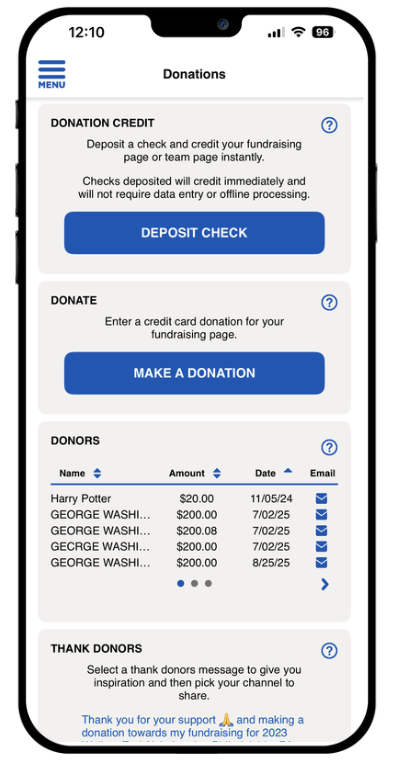
The Donations screen makes it easy to track contributions, thank your supporters, and stay motivated as the participant reaches their fundraising goals.
From the Donations Screen, the participant can:
🔹 Deposit Checks
If your organization has enabled mobile check deposit, participants can use this option to deposit check donations directly through the app and receive fundraising credit immediately.
🔹 Make a Donation
Tap the “Make a Donation” button to easily contribute to your own fundraising goal with a secure online transaction.
🔹 View Your Donors List
View a complete list of the particpants supporters, including:
• Donor names (unless marked anonymous)
• Donation amounts
• Date of donation
• A quick link to send a thank-you email
🔹 Say “Thank You” to Your Donors
Choose from pre-written thank-you messages or write your own personalized note. Share your thanks via:
✔ SMS
🙌 Stay Connected with Your Supporters
With just a few taps, the participant can show appreciation, build relationships, and keep the momentum going toward their fundraising goal.
🔗 Need to refer back to this article later? Here’s the direct link: Click here to view